



Find your region

Avire-Logo-Group

For countries not listed, see the Global site.

Note: Some products are available only in certain regions. Contact us regarding local availability.

2100-Alarm-OEM-and-Junction-Boards
Rath
OEM Systems

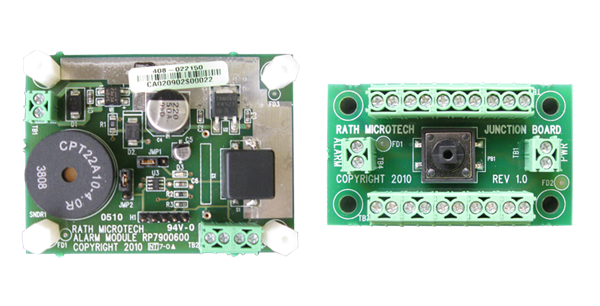
RATH Alarm and Junction Board

Compliant with
Overview
The OEM System – Alarm and Junction Board provides a simple, fully functional solution to meet the 2010 and 2013 ASME codes. The code states that each elevator phone needs to check for an active phone line at least once in a 24 hour period.
  • The OEM System – Alarm and Junction Board checks the complete phone line system from the elevators to the machine room, and from the machine room to the outside world
  • If an active phone line is not detected, an audible and visual alarm at the main landing panel is activated
  • A key switch is used to silence the audible alarm
  • If the phone line has not been re-established within a 24 hour period, the audible will resound
Play
Communications Failure Annuciator

Alarm Board:

  • 2″ H x 2.7″ W x 0.48″ D

Junction Board:

  • 1.3″ H x 2.25″ W x 0.44″ D

Power Requirements:

  • 24vdc required

Additional Features:

  • OEM boards for mounting behind the panel include: LED (requires momentary key switch)

Warranty:

  • 2 years

Files and Resources

Datasheet_2100 Alarm Emergency Communication Failure
Data Sheets
Download
RP8500ALARM_Installation Manual
Install Guides
Download
RATH Elevator Communication Failure Specifications
Specifications
Download

Education, Training & Support

We believe that ongoing education is paramount to your professional development.


As the code and training experts, our website offers all the documentation and educational resources needed to assist you in making the right decisions.

Education

Whether you’re looking to build your knowledge, troubleshoot an issue, or connect with a product expert – were here to help! Access the tools and support you need to make informed, code-compliant decisions.

See Education

FAQs

Get quick answers to common questions.

See FAQs

Technical Support

Schedule time with a support specialist.

Technical Support

Contact Sales

Speak with a sales expert about your project needs.

Contact Sales